What is Sensory-Friendly Routing?
This project introduces a Sensory-Friendly Routing feature added directly into Google Maps. It helps neurodiverse users — including people with autism, sensory processing disorder, anxiety, and mobility challenges — navigate their daily journeys without sensory overload. Instead of routing based only on speed and distance, this feature considers noise levels, crowd density, rest stop availability, and lighting to find the calmest path possible.
Why I Chose This
I chose this problem because 1 in 7 people globally have some form of disability, yet no major navigation app today considers their sensory needs. Google Maps tells you the fastest route. But for millions of neurodiverse users, the fastest route is rarely the right route. I wanted to design something that genuinely makes independent travel possible for people who are currently left out.
The Goal
My goal is to make everyday navigation calmer, more predictable, and genuinely accessible for neurodiverse users — without making them feel labelled or different from anyone else.
Before & After Comparison
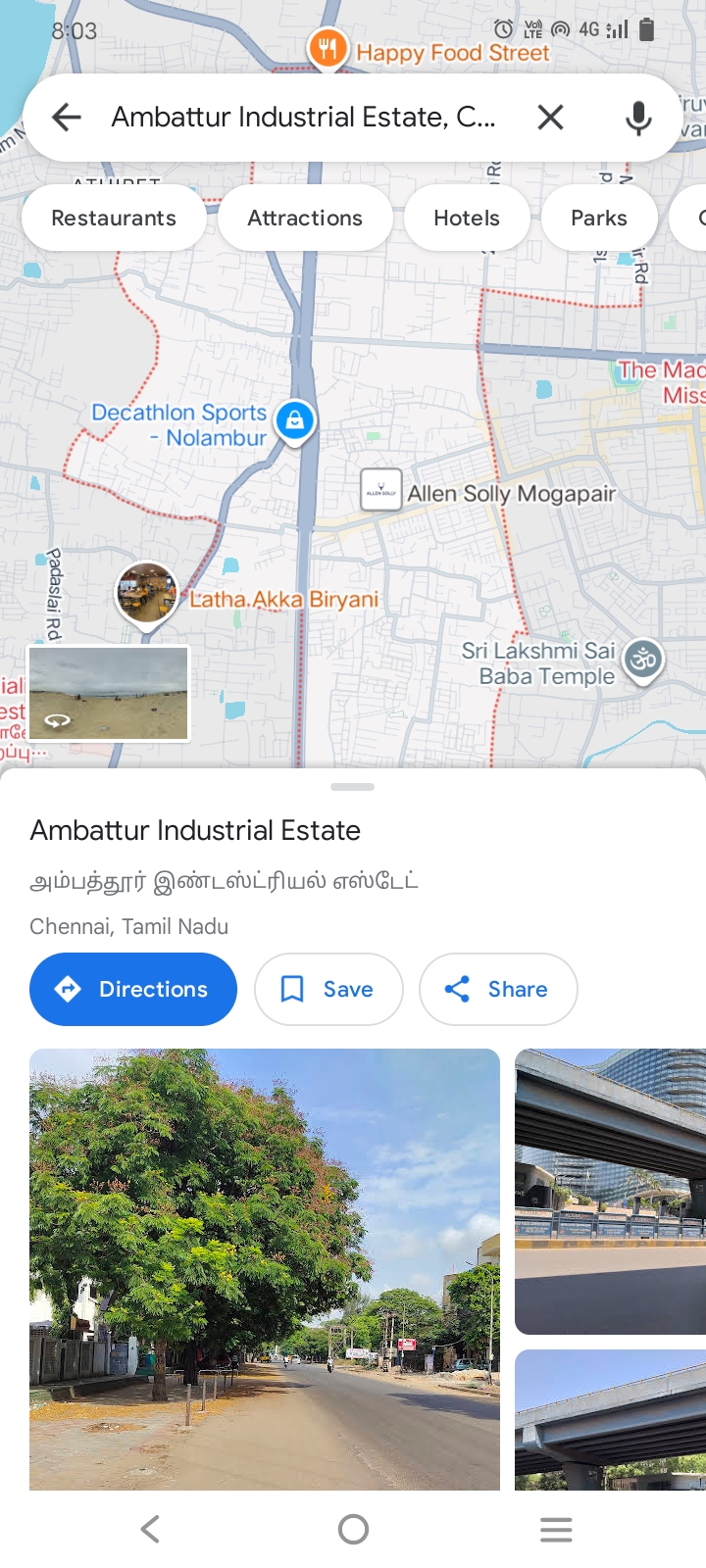
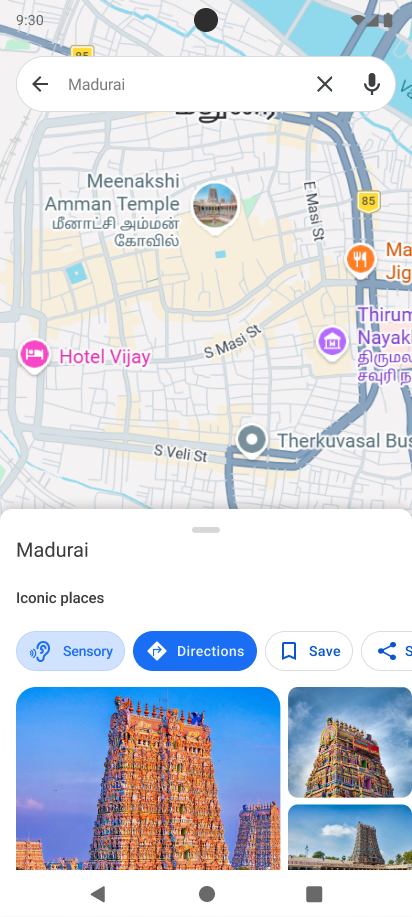
By comparing the original Google Maps directions screen with the new Sensory Mode integration, it is clear how the comfort-driven parameters blend seamlessly into the existing interface without disrupting standard navigation options.
Interactive Screen Walkthrough
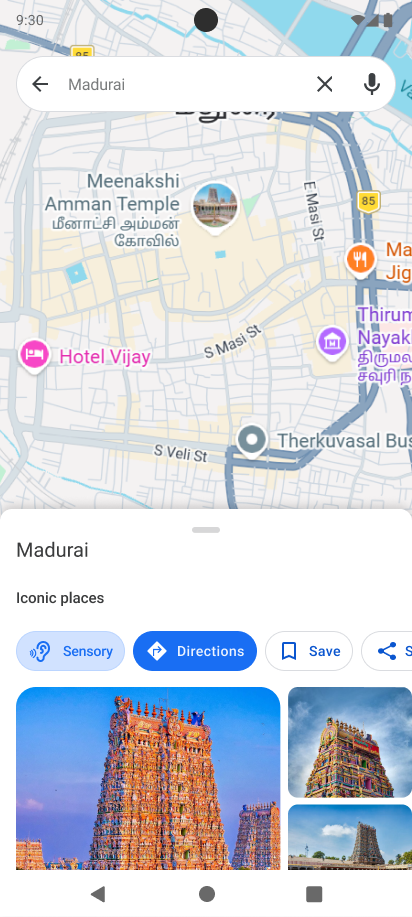
Entry Point (Sensory Toggle)
A new “Sensory” option is introduced directly within the directions interface of Google Maps. Placing the feature here ensures discoverability at the moment users are actively planning a journey, rather than hiding it inside settings.
Sensory Preferences
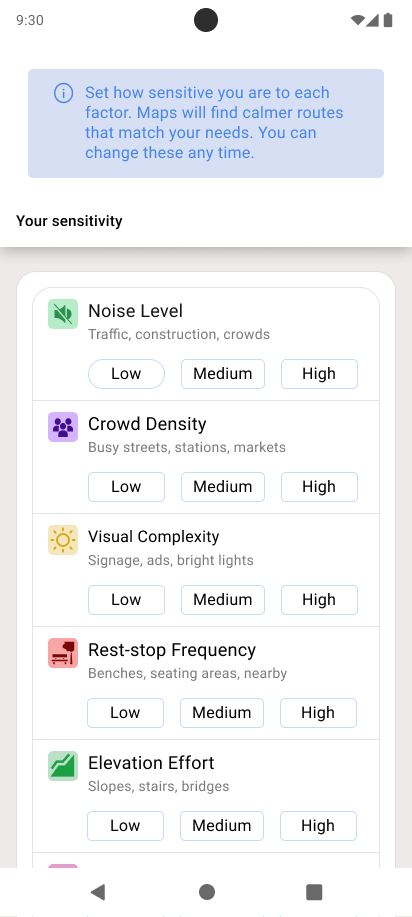
Users can quickly personalize their experience by selecting sensitivity levels for noise, crowd density, accessibility, and rest stops. The design keeps interactions simple and optional, reducing cognitive load while still allowing meaningful customization.
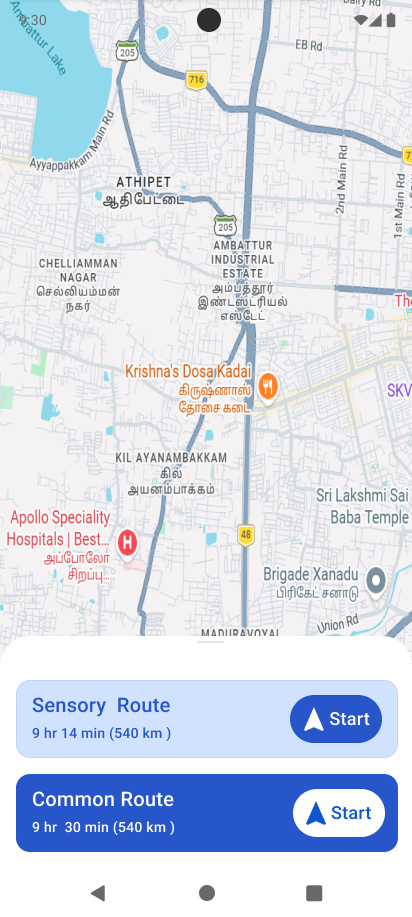
Route Selection (Sensory Scoring)
Routes are presented with a sensory score alongside time and distance, allowing users to balance comfort and efficiency. Instead of labeling routes, a neutral scoring system makes the feature inclusive and accessible to all users.
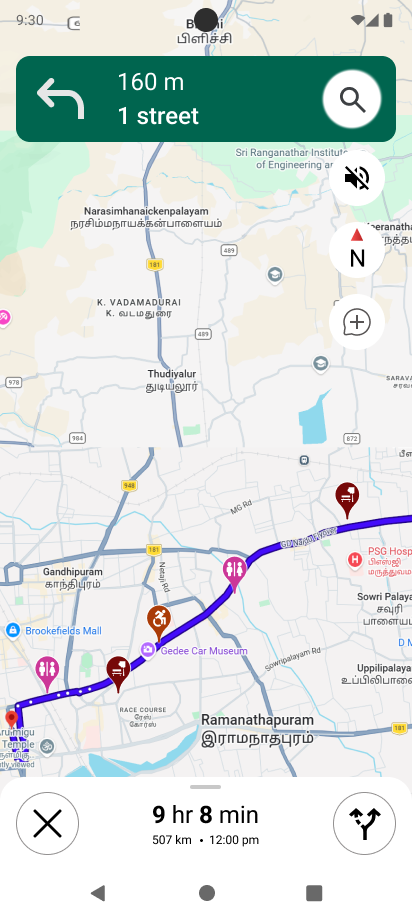
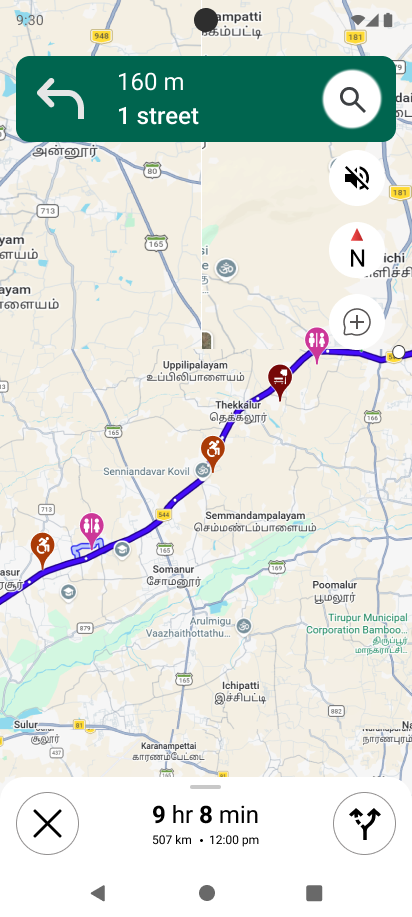
Map with Environmental Overlays
The map view is enhanced with visual overlays indicating quiet zones, busy areas, and available rest points. This helps users build a mental model of their journey and reduces uncertainty before and during navigation.
Navigation with Smart Alerts
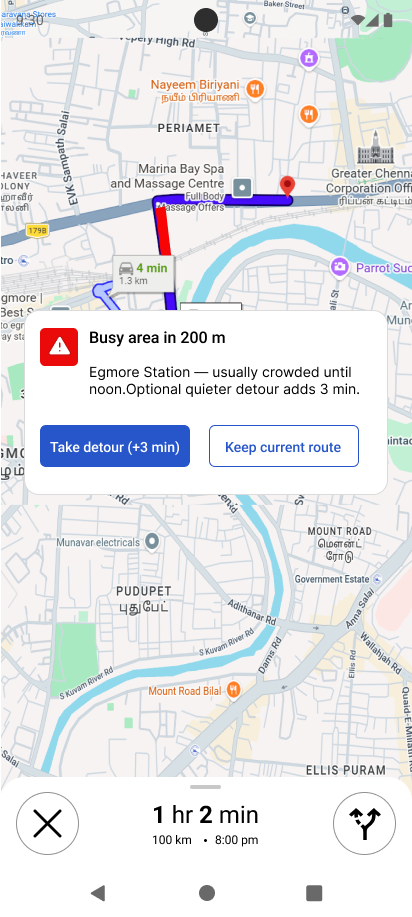
During navigation, the system provides proactive alerts about upcoming crowded or noisy areas. Users are offered optional detours, ensuring they remain in control while being supported by real-time insights.
Empathy Mapping
Based on insights from research into neurodiverse user behaviour and accessibility studies.
Thinks
- "Will this route be too loud or crowded?"
- "I need to know what the journey will feel like before I leave"
- "What if something unexpected happens on the way?"
- "I wish I could avoid that busy crossing near the market"
Feels
- Anxious about unpredictable situations
- Overwhelmed in crowded or noisy areas
- Frustrated that no app understands their needs
- Relieved when a journey goes exactly as planned
Says
- "I always plan my routes hours before I leave"
- "I avoid going out if I am not sure about the route"
- "I need to know where I can rest or find a toilet on the way"
- "I stopped using Maps because it never considers how I experience things"
Does
- Cross-references multiple apps before every trip
- Avoids going out during peak hours
- Plans rest stops manually before leaving home
- Chooses longer routes that feel safer over faster ones that feel risky
Key Discovery
Neurodiverse users spend more energy planning the journey than taking it. The stress starts before they even leave home.
User Personas
Synthesizing real-world needs, expectations, and challenges into core archetype profiles that direct our sensory navigation parameters.
Arjun, 24
Autistic software developer in Chennai. Plans every journey hours in advance because unexpected situations cause real anxiety. Needs to know exactly what a route will feel and look like before he ever leaves home.
Priya, 38
Wheelchair user with chronic fatigue, working part time as a teacher. Knows a route is technically accessible but never knows if she will have anywhere to sit and rest along the way. Often abandons journeys because energy runs out with no rest stop in sight.
Meera, 31
Parent of an autistic child who handles all school runs and daily errands. Needs routes that avoid loud markets, construction noise, and visually overwhelming streets so her child does not get overwhelmed mid journey.
What I Decided to Solve
I introduced a Sensory Mode feature addition to Google Maps that gives neurodiverse users the ability to set their personal sensory preferences — noise, crowds, lighting, rest stops, and restroom access — and receive routes scored for comfort, not just speed. An AI layer learns preferences over time and provides real-time advance alerts during navigation so users are never caught off guard.
Design Decisions
Architectural and experience design choices made to ensure safety, inclusion, and predictability during navigation without stigma.
Decision 1 Sensory score instead of a label
I used a number out of 10 instead of labels like "autism-friendly route". Labels stigmatise users and make them feel different. A neutral score is universal — anyone can care about a quieter, calmer walk regardless of why they need it.
Decision 2 Entry point on the directions page not settings
Users discover features when they need them most. The directions page is exactly the moment someone is thinking about their journey. Placing the toggle there means users find it naturally — not buried inside accessibility settings they may never visit.
Decision 3 Alerts fire at 300 metres minimum
A last second warning when the user is already near a disturbance creates panic instead of preventing it. Firing alerts at least 300 metres ahead gives calm, unhurried time to read, decide, and choose — without rushing or feeling pressured.
The Sensory User Flow
A step-by-step walk-through of the sensory navigation experience from start to destination.
Google Maps Home
User opens the standard map interface.
Search Destination
User searches for their target location.
Tap Sensory Mode Button
Feature is accessible directly on the directions configuration page.
Set Sensory Preferences
Configure sensitivity parameters: noise, crowds, lighting, rest stops, restrooms.
View Sensory- Routes
a sensory-friendly path based on your preferences and the default Google Maps route — so you can choose what works best for you.
Select Route & Start
User accepts route and begins active turn-by-turn guidance.
AI Real-time Monitoring
System tracks conditions dynamically ahead of user position.
Detour suggested to maintain high sensory score.
Arrive at Destination
User safely completes their travel.
Typography & Color
The aesthetic foundation of Sensory-Friendly Routing, designed for high-contrast visibility and calming, accessible navigation tones.
Typography
Primary Color
Brand Primary
#0B56CFColor Theme & Accents
Real Problems. Smart Solutions.
The Challenges
Google Maps routes only by speed and distance, ignoring sensory needs.
No advance warning when a noisy or crowded area is coming up.
Rest stops and restrooms are not shown along a walking route.
Neurodiverse users have to use 3 or more apps just to plan one safe journey.
Unexpected changes mid-journey cause real anxiety and distress.
No navigation app today learns and adapts to an individual's sensory profile.
The Interventions
Added sensory scoring to every route showing comfort level out of 10.
AI gives advance alerts at least 300 metres before a disturbance.
Rest stops and accessible restrooms are mapped and pinned along the route.
One single feature inside Google Maps handles everything.
Calm mode gives a one-tap safe exit during overwhelming moments.
AI learns preferences over time and auto-fills them before every trip.
Metrics That Matter
Average sensory score on quiet routes
Advance warning distance before disturbances
Sensory parameters mapped and tracked
To activate emergency Calm Mode
What I Learned
Predictability is a functional need, not a preference
For neurodiverse users, uncertainty is a real barrier to travel, making predictable routes an absolute necessity.
Edge cases are the most important design work
The calm mode SOS button taught me that designing for extreme stress moments often defines the core product utility.
AI should be invisible
The best AI experience is when users never actively think about the algorithms, but simply notice the app keeps matching their requirements better over time.
Entry points matter as much as features
Moving the sensory toggle to the active directions page instead of hiding it in deep settings completely changed its discoverability and rate of use.
Designing for the underserved helps everyone
Designing for one specific underserved group almost always ends up improving the universal usability and experience for all users.
Future Improvements
Public Transit Integration
Extend sensory scoring to public transit, tracking crowd levels and noise factors at each individual stop.
Time-of-Day Recommendations
Suggest optimal departure times (e.g. leaving 20 mins later to boost comfort score from 5/10 to 9/10).
Caregiver Companion Mode
Allow a family member or support worker to monitor the traveler's journey and alerts remotely.
Sensory Reporting Network
Enable user flags to report temporary noise zones or new rest spots in real time, similar to Waze.
Voice-Only Guidance
Develop a voice-only mode for users who struggle to interface with screens during sensory overload.